Documentation of QGIS Python plugin brdrQ - Autocorrectborders
Video
Description
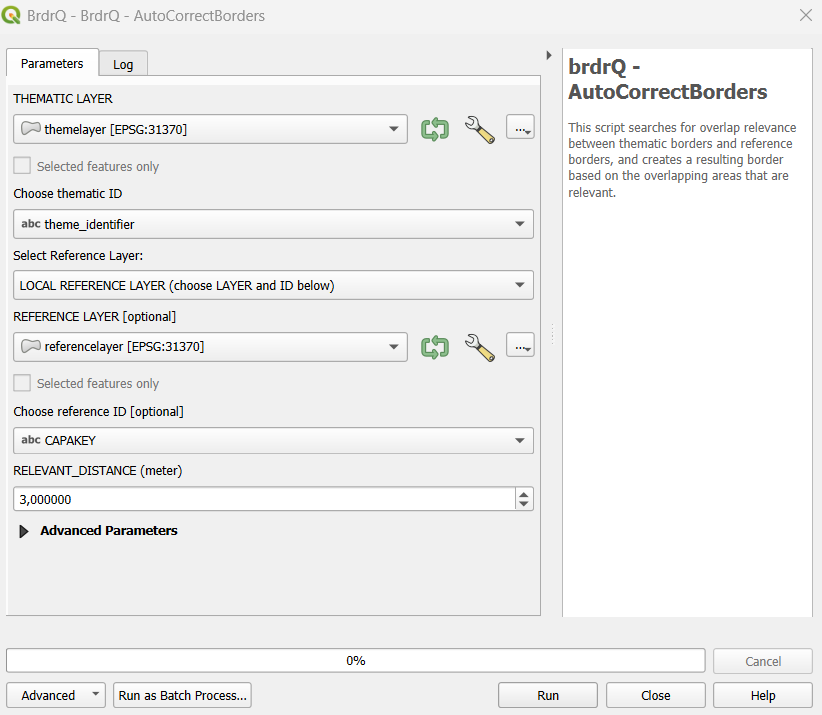
The processing algorithm, named Autocorrectborders, is developed to automatically adjust thematic boundaries to reference boundaries. It searches for relevant overlap between thematic boundaries and reference boundaries, and creates a resulting boundary based on the relevant overlapping areas.
Because Autocorrectborders is exposed as a QGIS Processing algorithm, it is also available for use in the QGIS Model Designer.
Parameter Guide
Each parameter is documented once with the same structure: Definition, Why use it, Choices, and Impact.
Thematic Layer
- Definition: Input vector layer (polygon, line, or point) in projected CRS (meters).
- Why use it: Defines the geometry that will be corrected.
- Choices: Any valid layer with stable geometry and valid CRS.
- Impact: Invalid CRS or mixed quality input causes unreliable alignment.
Thematic ID
- Definition: Unique feature identifier in the thematic layer.
- Why use it: Keeps feature lineage and output traceable.
- Choices: Text or numeric field with unique values.
- Impact: Non-unique IDs can break one-to-one interpretation of results.
Reference / Local reference layer / Reference ID (unique!)
- Definition: Reference source selection (LOCREF or GRB on-the-fly) + reference ID field.
- Why use it: Determines geometric truth for snapping/alignment.
- Choices: Local reference for large/stable workflows; GRB for direct service-based reference.
- Impact: Better reference quality directly improves output quality.
Relevant Distance (meters)
- Definition: Maximum allowed geometry shift.
- Why use it: Controls how far features may move to match reference.
- Choices: Low (1-2), medium (3-5), high (>10) depending on source quality.
- Impact: Lower values are conservative/faster; higher values are stronger/slower and may increase review cases.
Use predictions
- Definition: Enables full-scan candidate search over distance steps.
- Why use it: Finds stable candidates in ambiguous situations.
- Choices: False (quick scan) or True (full scan).
- Impact: True improves candidate quality but increases processing time.
Prediction Strategy
- Definition: Output policy when multiple predictions exist.
- Why use it: Controls whether output is deterministic or review-oriented.
- Choices: BEST, ALL, ORIGINAL.
- Impact: BEST is production-friendly, ALL is analysis-heavy, ORIGINAL is safest under ambiguity.
Full Reference Strategy
- Definition: Preference for predictions with full overlap to reference.
- Why use it: Enforces stricter geometric consistency when needed.
- Choices: prefer/strict/no preference modes.
- Impact: Stricter modes reduce risky candidates but may omit usable alternatives.
Processor
- Definition: Geometry processing engine selector.
- Why use it: Optimizes runtime and robustness per geometry type.
- Choices: Prefer AlignerGeometryProcessor.
- Impact: Correct processor choice improves speed and stability.
Open Domain Strategy
- Definition: Behavior for geometry parts not covered by reference (Open Domain).
- Why use it: Aligns output with legal/operational boundary policy.
- Choices: EXCLUDE, ASIS, SNAP_INNER_SIDE, SNAP_ALL_SIDE.
- Impact: Changes whether and how non-reference-covered areas are retained.
Snap Strategy
- Definition: Vertex snapping policy (mainly line/point workflows).
- Why use it: Controls strictness of snapping to real reference vertices.
- Choices: NO_PREFERENCE, PREFER_VERTICES, ONLY_VERTICES.
- Impact: Stricter snapping yields cleaner topology but fewer candidates.
Threshold overlap percentage (%)
- Definition: Fallback overlap threshold for relevance decisions.
- Why use it: Resolves edge cases where relevance is unclear.
- Choices: 0-100 (default around 50).
- Impact: Higher values are stricter; lower values are more permissive.
REVIEW_PERCENTAGE
- Definition: Threshold to classify results as o_review.
- Why use it: Controls QA workload.
- Choices: Lower for strict QA, higher for more automation.
- Impact: Lower threshold increases manual review volume.
Work Folder
- Definition: Output/log storage location.
- Why use it: Ensures reproducible output organization.
- Choices: Empty (default local) or explicit path.
- Impact: Explicit folder simplifies batch audit and traceability.
Show Intermediate processing results
- Definition: Adds intermediate layers for diagnostics.
- Why use it: Helps understand why alignment succeeded/failed.
- Choices: False/True.
- Impact: Better interpretability, slightly heavier output.
Write extra logging (from brdr-log)
- Definition: Writes extended processing logs.
- Why use it: Troubleshooting and audit.
- Choices: False/True.
- Impact: Enables root-cause analysis at cost of larger logs.
Recommended Presets
- Fast Scan: PREDICTIONS=False, Relevant Distance=2-4, REVIEW_PERCENTAGE=10.
- Balanced Production: PREDICTIONS=True, Prediction Strategy=BEST, Full Reference Strategy=PREFER_FULL_REFERENCE, Relevant Distance=3-5.
- Strict QA: lower REVIEW_PERCENTAGE (5-8), conservative Relevant Distance, stricter full-reference mode.
- Exploration: PREDICTIONS=True, Prediction Strategy=ALL, SHOW_INTERMEDIATE_LAYERS=True, LOG_INFO=True.
Output Parameters
The script generates a GROUP layer with several output layers in the TOC:
- CORRECTION_X_Y: a copy of the thematic layer with updated geometries, divided into categories (brdrq_state)
- brdrQ_RESULT_X_Y: resulting geometries after alignment
- brdrQ_DIFF_X_Y: differences (+ and -) between original and resulting geometry
- brdrQ_DIFF_MIN_X_Y:differences (-) between original and resulting geometry
- brdrQ_DIFF_PLUS_X_Y:differences (+) between original and resulting geometry
- (optional) brdrQ_RLVNT_DIFF_X_Y: relevant differences (parts to exclude), used when processing the resulting geometry
- (optional) brdrQ_RLVNT_ISECT_X_Y: relevant intersection (parts to include), used when processing the resulting geometry
The name includes which ‘RELEVANT_DISTANCE (X)’ and ‘REFERENCE (Y)’ is used 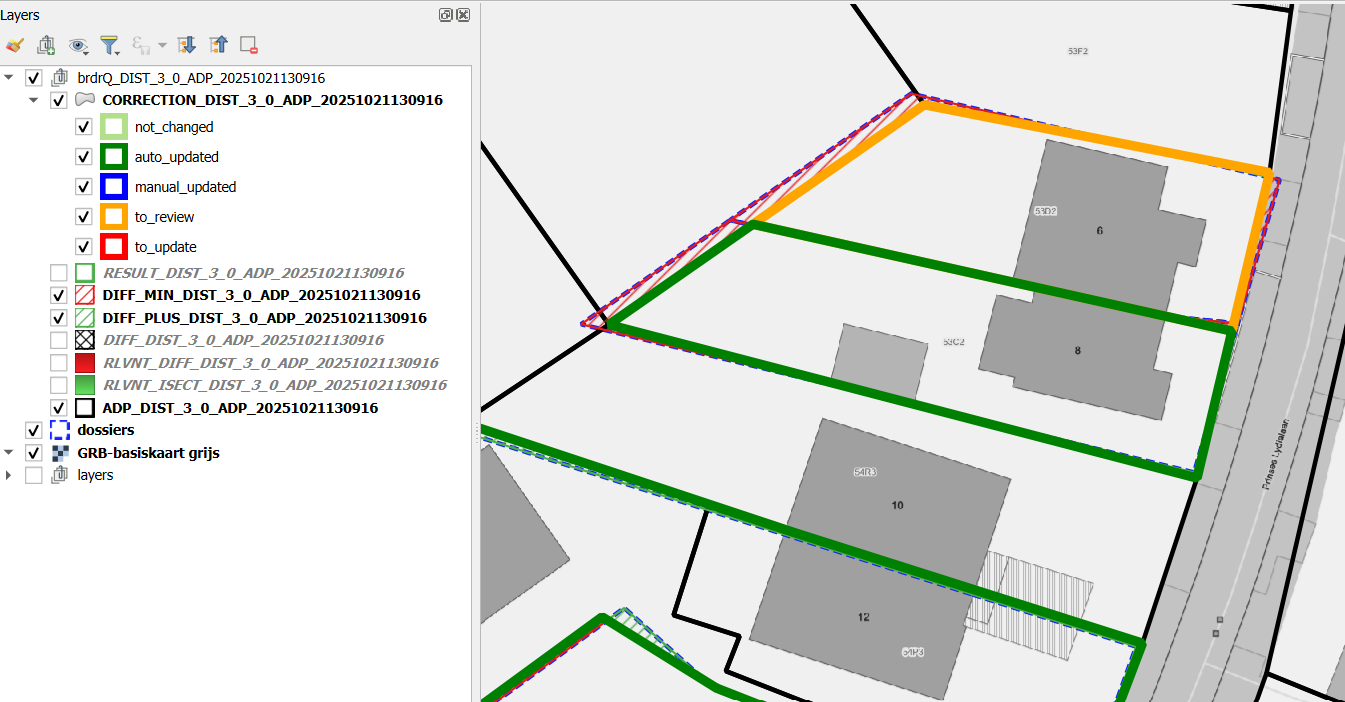
Example of Usage
Here is an example of how to use the script in Python:
{
                "INPUT_THEMATIC": themelayername,
                "COMBOBOX_ID_THEME": "theme_identifier",
                "RELEVANT_DISTANCE": 2,
                "ENUM_REFERENCE": 1,
                "INPUT_REFERENCE": None,
                "COMBOBOX_ID_REFERENCE": None,
                "WORK_FOLDER": 'brdrq',
                "ENUM_OD_STRATEGY": 1,
                "ENUM_SNAP_STRATEGY": 1,
                "ENUM_PROCESSOR": 0,
                "THRESHOLD_OVERLAP_PERCENTAGE": 50,
                  "PREDICTIONS": 0,
                "FULL_REFERENCE_STRATEGY": 2,
                "PREDICTION_STRATEGY": 0,
                "REVIEW_PERCENTAGE": 10,
                "ADD_METADATA": True,
                "ADD_ATTRIBUTES": True,
                "SHOW_INTERMEDIATE_LAYERS": True,
                "LOG_INFO": False,
            }

processing.run('brdrqprovider:brdrqautocorrectborders', params)
TIPS
Set PREDICTIONS for the best results. This will analyse the full range of RELEVANT_DISTANCES (FULL SCAN), and returns the best stable results. A side-effect is that the processing-time is much slower. By default this parameter is set to False to have quicker results (QUICK SCAN), missing the better results.
Analyse your thematic dataset and try to gain insight into the ‘deviation’ (precision and accuracy from the reference layer):
- Where does the thematic data come from?
- when was it created,
- on what reference limits was it drawn at the time,
- Which drawing rules have been applied (e.g. accuracy of 0.5m)
- …
This allows you to gain insight into the ‘deviation’ and which RELEVANT_DISTANCE value can best be applied.
- The current version of the script assumes that both the thematic layer and reference layer are in the same projected CRS with units in meter.
- Thematic boundaries consisting of 1 or a few reference polygons are processed by the script in a few seconds. If the thematic boundaries cover a very large area (~1000 and reference polygons), it may take several minutes for the OUTPUT to be calculated. It’s best to let QGIS finish this processing before proceeding
- In practice, we notice that large thematic demarcations are sometimes drawn more roughly (less precisely or inaccurately), so that a high RELEVANT DISTANCE is required to shift them to the reference file. For large areas that are drawn ‘roughly’, it is best to use a high RELEVANT_DISTANCE (e.g. >10 meters) and:
- OD-strategy EXCLUDE: if you want to completely exclude all public domain
- OD-strategy AS_IS: if you want to include all the covered public domain AS IS in the result
- OD strategy SNAP_SINGLE_SIDE: if you want to keep the public domain within the demarcation, but move the edges to the inner side of the thematic polygon
- OD strategy SNAP_ALL_SIDE: if you want to keep the public domain within the demarcation, but move the edges to the inner & outer side of the thematic polygon
OUTPUT - FIELDS
This sections lists fieldnames that can be found in the output layer and explains what this field is about.
| Attribute | Type | Description |
|---|---|---|
| brdr_id | Integer | Internal unique identifier for the processed feature. |
| brdr_area | Double | The calculated area of the resulting geometry (\(m^2\)). |
| brdr_perimeter | Double | The total length of the boundary of the resulting geometry (\(m\)). |
| brdr_shape_index | Double | A complexity metric of the shape (e.g., compactness ratio). |
| brdr_stability | Boolean | Indicates if the geometry remains stable across multiple calculation iterations. |
| brdr_prediction_score | Double | Confidence score (%) of the alignment prediction. |
| brdr_prediction_count | Integer | Number of candidate matches found for the alignment. |
| brdr_evaluation | String | Categorization of the result (e.g., prediction_unique, to_check_prediction_multi). |
| brdr_relevant_distance | Double | The buffer or search distance used during the alignment procedure (\(m\)). |
| brdr_sym_diff_area_index | Double | The absolute area of the symmetrical difference between base and target (\(m^2\)). |
| brdr_sym_diff_area_index_perc | Double | The symmetrical difference expressed as a percentage of the total area. |
| brdr_diff_area_index | Double | The absolute area difference between input and output geometries (\(m^2\)). |
| brdr_diff_length_index | Double | The absolute difference in boundary length (\(m\)). |
| brdr_full_actual | Boolean | Flag indicating if the alignment covers the full extent of the actual feature. |
| brdr_remark | String | Automated logs or warnings generated during the geometry processing. |
| brdr_metadata | JSON/Object | Embedded SOSA/SSN metadata containing the lineage, sensors, and procedures used. |